



























.jpeg)






























































Instagram Reels to Auto-Play Next Video Automatically, Feature Goes Live in India
Scrolling through Reels on Instagram will no longer be necessary, as after one Reel ends, the next will automatically play. Instagram has made auto-scrolling Reels live in India. This new feature eliminates the need for users to manually swipe. To enable this feature, open Reels on Instagram, tap the three-dot menu, and enable auto-scroll.


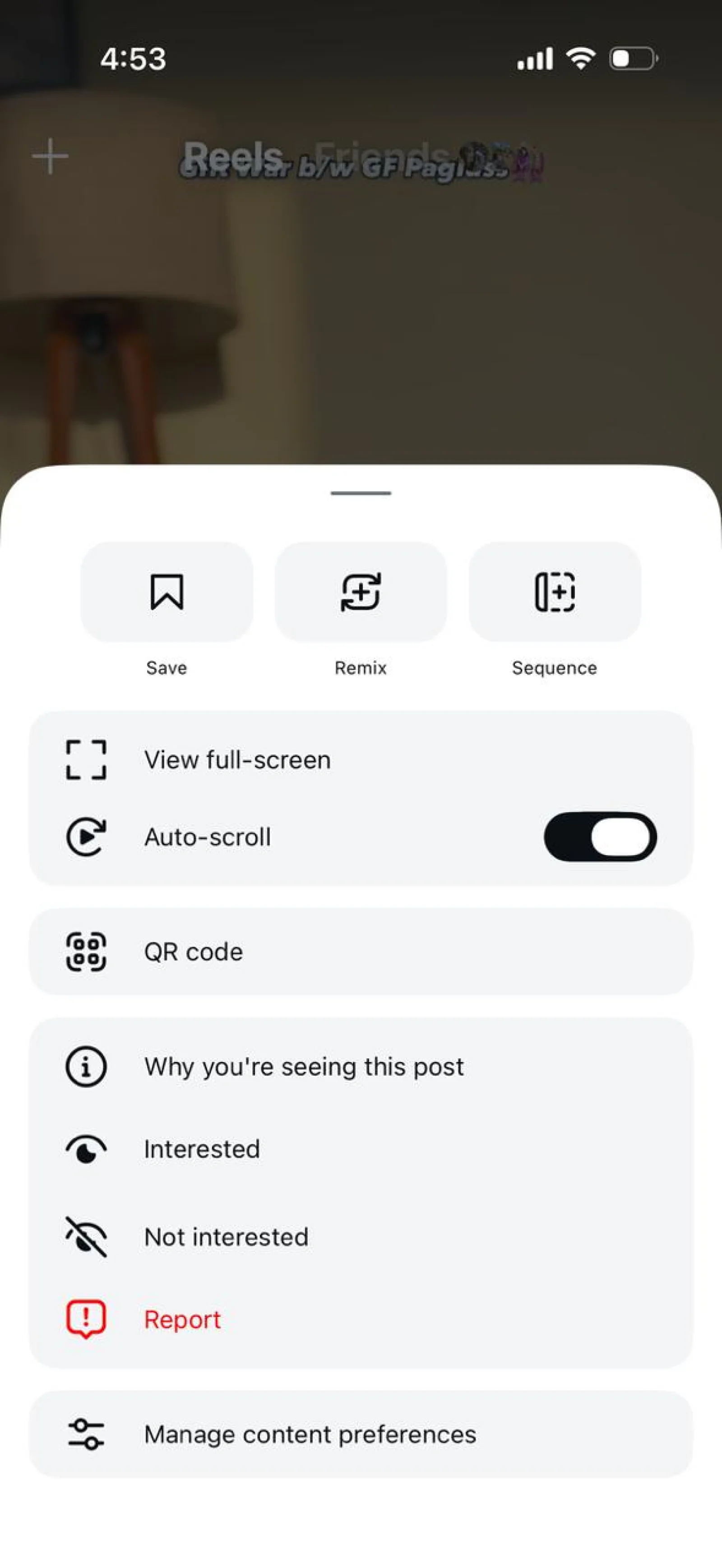


Instagram will now allow its users to scroll through Reels automatically. This implies that once one Reel ends, the video for the next Reel will start automatically. Previously, if you did not scroll through the video by tapping the next button, the video would continuously loop over and over again. This feature will come in handy if you are watching Reels while doing something else.
Instagram has brought ‘auto-scrolling reels’ live in India. If you wish to install it on your own mobile device, first, you’ll need to upgrade your Instagram app on your mobile phone. Here, all details on how to install it will be described.
How to enable auto-scroll on Instagram?
- Step 1 - First, open any Reel on Instagram.
- Step 2 - Next, tap the three-dot menu on the bottom right. You'll find it below the share button.
- Step 3 - You'll see the Auto-Scroll button here. Enable it.
As the name suggests, the Reels in your feed will automatically scroll. Users won't need to scroll repeatedly. Instagram designed this feature to offer users a hands-free experience.
Would you like to receive news updates on WhatsApp?
Chat on WhatsApp