




























.jpeg)























































Apple Adds 48MP Manual Photo and Video Capture to iPhone Camera Settings
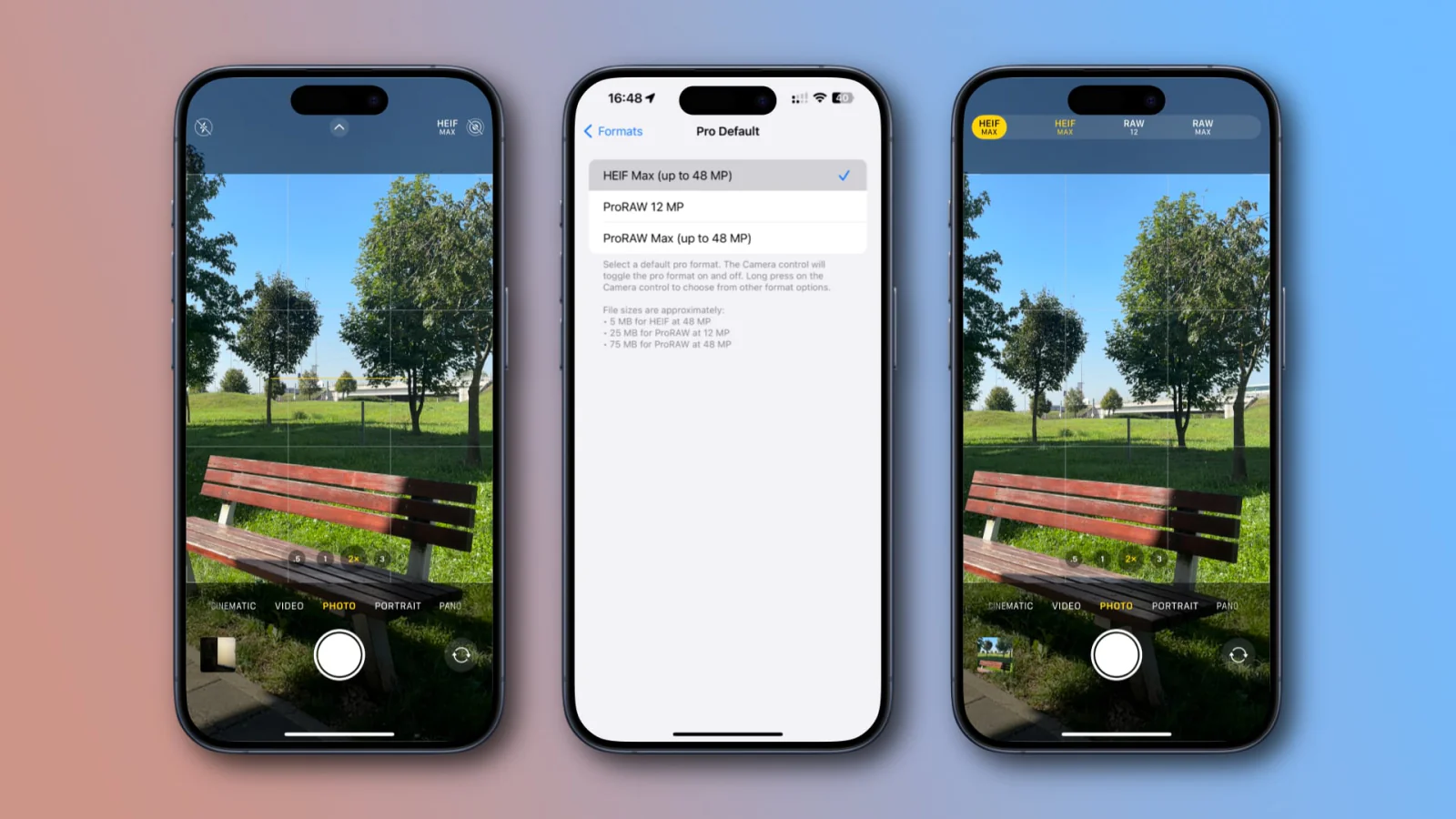
Apple has introduced 48MP photo and video recording with the iPhone 17 series and iOS 26. Users need to go to the iPhone's settings and enable Apple ProRAW and resolution in the camera option. This will activate 48MP mode in the camera app, allowing for high-quality photos. Keep in mind that high-resolution photos will increase storage consumption on the device.




Apple just released iOS 26 and the iPhone 17 series. Apple has also introduced some new features to the iPhone, but did you know that you can now also take excellent-quality photos with your iPhone?
Yes, Apple has included an option in the camera system of the iPhone where you can manually capture photos and videos of up to 48 megapixels. You don't need to do much in order to access this feature; you just need to make some changes in the settings. After switching on this setting, you'll get some more options.
You will then be able to take pictures in high-resolution mode, which will offer more detail and better quality. iPhone Pro models will find this feature particularly useful, with non-Pro models being given only the ability to control resolution.
How to Turn On 48MP Mode on iPhone: